
Friday, December 4, 2009
Monday, November 30, 2009
Sharpening in Photoshop article
A quick informative read:
Professional Sharpening in Photoshop
Adapted from Photoshop CS4 After the Shoot (Wiley Publishing)
By Mark Fitzgerald
Professional Sharpening in Photoshop
Adapted from Photoshop CS4 After the Shoot (Wiley Publishing)
By Mark Fitzgerald


Tuesday, November 24, 2009
Favorite websites of the day
loscoloresolvidados.com
xixinobanho.org.br (I don't understand this one but the animations are oh so cute)
xixinobanho.org.br (I don't understand this one but the animations are oh so cute)
Wednesday, November 4, 2009
Inspiration: Safety goat

Love the design of this website... maybe because I'm into drawing trees at the moment... anyway, I like: the autumnish colours of the tree, the 'paper / collage" feel of the whole design, the gritty background texture, the bottom curly waves... and the fact that it's a woman designer.
Klok: time management made easy
 Easy to use time tracking management tool... free to download, friendly interface, excellent app...
Saturday, October 10, 2009
Inspiration: Circus theme ( Behance network )

Aside from being a source of inspiration, Behance network also has a listing of creative jobs and freelance opportunities.
Friday, October 9, 2009

Thursday, September 10, 2009
After Effect / Simple way to create menu with an animated background
This is a summary of the steps to create a simple dvd menu using Encore / AfterEffects / Photoshop:
AfterEffects
AfterEffects
- First create the animation in After Effects, including the menu writing or movie thumbnails or anything that will be appearing as the menu screen of the dvd.
- Save the image layers at (/after) the looping point, do "Composition" / Save Frame as / Photoshop layers
- Render the movie
- Open the saved frame file in photoshop, so you have a background on which to draw your buttons
- Create a layer for each of the menu button, like a highlighted bounding box or something like that
- Name each of those layers with appropriate name, preceded by: (=1)
- Get rid of all other layers, so that only the (=1) named layers are left
- In Encore, Import the movie and put it in a timeline
- Import the psd file as menu
- Select the menu
- Under the layers panel, for each button layer, activate it as a button by clicking on the button little square checkbox (next to the lock checkbox)
- Under the menu / Motion tab => use the pick whip to link to the movie file, do the same for the audio.
- In the 'Loop Point', set the time to where the movie should loop from
- Ctrl/Right click this menu and set it as "first play"
- In the flowchart, link each button to whichever asset
- Don't forget to set the 'end actions' for each asset
Wednesday, September 9, 2009
Inspiration: Animation from "Tiny invenstions"

This is a really cool animation...
http://tinyinventions.com/animation/electriccar.html
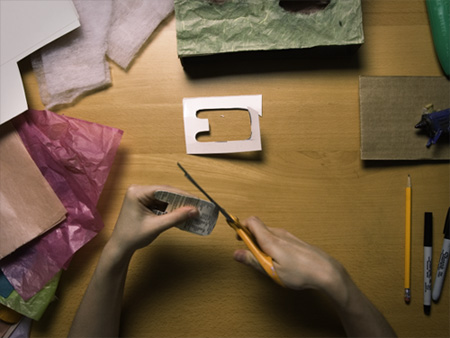
Cardboard and all sorts of crafty stuff used, check the creation process in their blog: http://tinyinventions.com/blog/
Monday, September 7, 2009
Creating a "Mood Board"

This 'from the couch' video gives ideas on how to go about doing a 'mood board' in the early design phases: http://www.from-the-couch.com/post.cfm/title/creating-an-effective-mood-board
Basically:
* create a wireframe layout
* pick colour themes
* find inspirational ideas / design / websites (and write in detail why they are)
* find textures / images that will set the 'mood'
* put together all of it in a clean professional doco to present to the client
Creative cow website

Creative cow is a peer to peer support community for media production. Packed with video tutorials on all Adobe CS.
High dynamic Range Photography technique...
Photoshop has a built in HDR assembler, here is a quick summary of the steps:
- Take at least 3 photos of subject while bracketing (eg over / under expose changing the shutter speed, !not! the aperture), preferably using a tripod (Photoshop will more or less compensate for camera shake otherwise).
- Open the photos in Photoshop
- Click File > Automate > Merge to HDR.
- This saves the image as a pbs / 32 bits per channel.
- Convert to 16 bits per channel (for a print format), adjusting histogram / tonal range (local adaptation)
- or convert to 8 bits per channel (for a jpg/ screen only)
Sunday, August 9, 2009

Hints on how t o improve your Typography
8 quick hints summary on improving your typography:
Source: read full article in Smashing magazine
Also a good read: Mark Boulton's article
- Measure: ~ 52-78 characters (including spaces) per line / column
- Leading: 2-5pt larger than the type size
- Keep in mind too: Small Measure, less leading. Wide Measure, more leading.
- About tracking: rule of thumb in tracking your words (not the characters) is that the shorter the line length the tighter the tracking
- Hang quotes: use negative indent (text-indent)
- Continuous rhythm in vertical space
- Avoid widows & orphans (short line or single word at the end of a paragraph)
- Use emphasis without interrupting the rythm
- Use scale to establishes a typographic hierarchy
- Clean rag, eg keep uneven side balanced without sudden “holes” or awkward shapes.
Source: read full article in Smashing magazine
Also a good read: Mark Boulton's article
Wednesday, July 29, 2009
Inspiration: Alexone
http://www.alexone.net/
Flash portfolio website, extensively using hand drawings, a bit slow but worth the wait... (the preloaders are fun to watch anyway...)
Flash portfolio website, extensively using hand drawings, a bit slow but worth the wait... (the preloaders are fun to watch anyway...)
Inspiration: Creaktif
http://www.creaktif.com/
A portfolio / flash website, fun to use, original design, super fast.
A portfolio / flash website, fun to use, original design, super fast.
Monday, July 27, 2009
Wednesday, July 1, 2009
Inspiration: Cameron Gray
Young australian artist...
Uses a lot of dark mood / textured images with 3D models from Poser...

Uses a lot of dark mood / textured images with 3D models from Poser...
Friday, June 19, 2009

Monday, June 8, 2009


Wednesday, June 3, 2009
Flash resources
A collection of good quality and clear tutorials (using tweenmax a lot): flashmymind
(download tweenmaxas3 plugin)
(download tweenmaxas3 plugin)
Wednesday, May 20, 2009

Tuesday, May 19, 2009
Bittbox heaven

This guy is an GEM.
His Blog: www.bittbox.com is packed with interesting articles, tips, high quality freebies for photoshop, fonts etc...
Also loads of high res textures on his flickr page.
Thursday, May 14, 2009


Wednesday, May 13, 2009

Sunday, May 10, 2009
Sunday, May 3, 2009
Inspiration: Anne Julie Aubry


"Anne Julie Aubry est née en 1980 dans une petite ville dans l’Est de la France. Elle a obtenu son diplôme de Beaux-Arts en 2001, l’Ecole de l’image d’Epinal avec un diplôme en Illustration."
Her website: www.annejulie-art.com
Her blog: www.annejulie-art.com/blog/
Friday, May 1, 2009
Martina Strobel

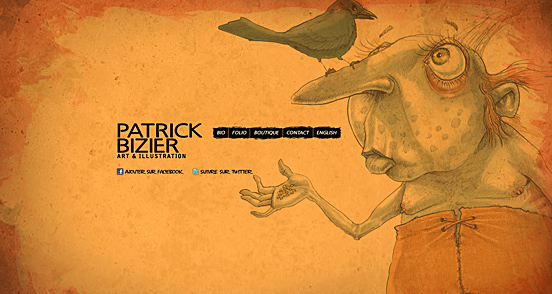
She's a German artist, most of her stuff looks made in illustrator and is just awesome. Her website gallery looks great too, made with Flash, simple, user friendly, fast and smooth.
Wednesday, April 29, 2009
Inspiration: thedesigninspiration.com
http://thedesigninspiration.com/:
The Design Inspiration website was "created by a group of designers who are seeking various design inspiration every day.
To make every designer's life easier, we decided to feature the best logos, illustrations, websites, photos and patterns from the most talented designers around the world. And we would like to make sure you are getting the fresh and top quality design inspiration daily."

Pre or post next mission: Noahnina
- do the Director anim in flash
- graphics, timeline
- actionscript it
- publish it / decide where to host
- share it
- graphics, timeline
- actionscript it
- publish it / decide where to host
- share it
Next mission: Go to the library...
... get really old illustrated books on fauna, flora...
or fashion...
... mythology...
... inventions...
has to be > 70 years old to be public domain = no licensing issues
see what pieces and textures are there...
or fashion...
... mythology...
... inventions...
has to be > 70 years old to be public domain = no licensing issues
see what pieces and textures are there...
Tuesday, April 28, 2009
AS3 photo gallery tutorials
Some tutorials on using Flash ActionScript 3 to make fancy photo galleries
More random effects tutorials on flash-game-design.com.
More random effects tutorials on flash-game-design.com.
Monday, April 27, 2009
ACH Studio

ACH Studio
Web design, graphic design and creative agency
Web sites, logos, characters, wallpapers...
Sleek dark background, soft spot lights on menus
combined with use of post its / torn papers / scribbles
More of the earthy type web design

carbonica.org
Soft earthy colors
Scribbled menus
Great simple flash top banneer with trees popping...
Paper / fabric natural textures


Subscribe to:
Posts (Atom)

